XML Einrichten Version 1.3
PACI Element
XML Einrichten Version 1.3 > ORDERMessage Element > ORDERS Element > LINE Element : PACI Element
Namespace (none)
Type
DocumentPaci Complex Type
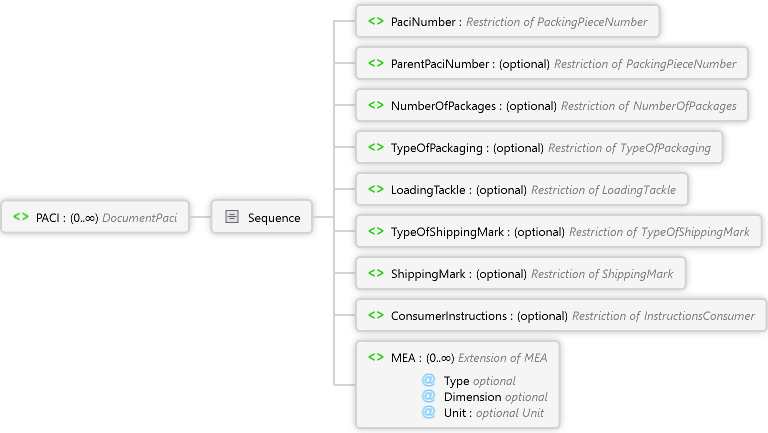
Diagram
MEA Element ConsumerInstructions Element ShippingMark Element TypeOfShippingMark Element LoadingTackle Element TypeOfPackaging Element NumberOfPackages Element ParentPaciNumber Element PaciNumber Element Sequence PACI Element
Overview
Sequence
Type optional Restriction of xs:string
Type if measurement
Code list (for articles and packaging):
AAE = Weight or Volumen
PD = Dimension
Use the following codes for special article measurements:
ABK = Outside dimension
ABL = Inside dimension
Y2E = Maximum dimension
Y3E = Minimum dimensionMinimalmaß z.B. Klappstuhl eingeklappt
Y4E = Lying dimension
Y5E = Sitting dimension
Dimension optional Restriction of xs:string
Gemessene Dimension
Verwenden Sie folgende Codes für Artikel und Packstücke:
DP = Tiefe
HT = Höhe
LN = Länge
WD = Breite
DI = Durchmesser
AAA = Netto Gewicht Ware inkl. Endkundenverpackung
AAB = Brutto Gewicht Ware inkl. Transportverpackung
AAF = Netto Gewicht Ware ohne jede Verpackung
ABJ = Volumen
Mesaured dimension
use this codes for articles and packaging:
DP = Depth
HT = Height
LN = Length
WD = Width
DI = Diameter
AAA = Net weight goods incl. end-consumer packaging
AAB = Gross weight goods incl. packaging for transporz
AAF = Net weight goods without any packaging
ABJ = Volume
Unit optional Unit Simple Type
Source
<xs:element name="PACI" type="DocumentPaci" minOccurs="0" maxOccurs="unbounded" xmlns:xs="http://www.w3.org/2001/XMLSchema" />
See Also
LINE ElementORDERS ElementORDERMessage ElementXML Einrichten Version 1.3